


Recently I installed TFS 2013.2 and modified some Build Templates. I also installed a separate Build Server that executes these builds for me.
My build template was based on the default TFS 2013 Build template (Tfvctemplate.12.xaml)
When my build executed, it ran for a while, but eventually it stopped with a nasty error message
An error occurred while copying diagnostic activity logs to the drop location.
Details: Could not load file or assembly 'Microsoft.VisualStudio.Services.WebApi,
Version=12.0.0.0, Culture=neutral, PublicKeyToken=b03f5f7f11d50a3a' or one
of its dependencies.
The located assembly's manifest definition does not match the assembly reference.
(Exception from HRESULT: 0x80131040)

The strangest thing was that my drop folder could be found and that the logs were there as well.
After searching for a while I found that it was all about 2 assemblies that were introduced in TFS 2013
- · Microsoft.VisualStudio.Services.Common.dll
- · Microsoft.VisualStudio.Services.WebApi.dll
I copied the assemblies to the Team Foundation Server Tools Directory (normally here: C:\Program Files\Microsoft Team Foundation Server 12.0\Tools )
I restarted the Team Foundation Server Build Service Host …
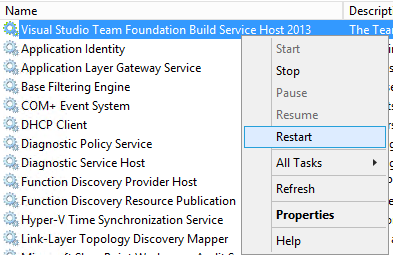
And my error was gone!
Hope this helps !
 The Road to ALM
7 responses to “Error in TFS 2013 build – Could not load file or assembly ‘Microsoft.VisualStudio.Services.WebApi”
It sure looks like this little trick has worked for me too. Thanks for your posting!
Cool, fixed the same issue for me as well. Thanks for that posting.
Real crap! TFS assemblies in 2013 depend on VisualStudio dlls !
(example: look at MappingConflictException inheritance)
Yes, but you can include them in you r output and it will work..
HI,Where i need to download those dll’s.Please help me..
Thanks in advance.
You get them with Team Explorer 2013 installed
Working great , thanks .